From STEP to Sheet

Engineering drawings, generated from CAD.

Upload a STEP or IGES model. Cyanograph orients it, picks the views, runs the dimensions, and writes one sheet per component. Export PDF, DXF, SVG, or PNG.

ISO · ANSI 1st · 3rd angle A5 → A0 PDF · DXF · SVG · PNG
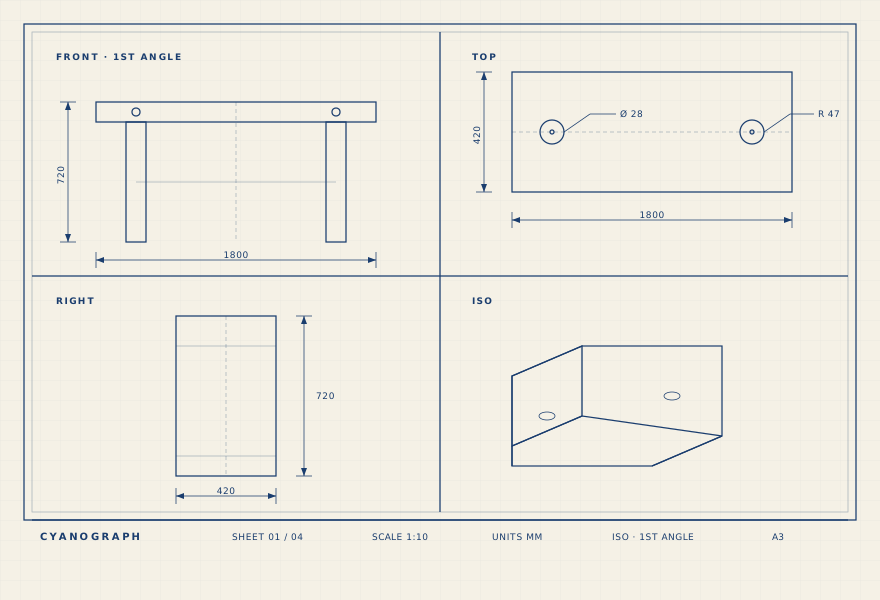
Orthographic sheet preview: front, top, right, and isometric views with dimensions and a title block.
Auto-laid sheet · 4 views · chain dims · title block
What it does

Geometry in. Sheets out.

01

Orthographic and iso views

OBB-aligned setup, hidden-line removal, 1st-angle ISO by default. Front, top, right, and an iso pictorial on every overview sheet.

02

Per-component detail sheets

The assembly is walked, identical bodies are grouped, and every component gets its own sheet. Loose hardware is rendered once with a quantity callout.

03

Export anywhere

PDF, DXF, SVG, and PNG. ISO and ANSI title blocks. A5 through A0, Letter through ANSI E. One zip, every sheet, ready to send.

See it

From this STEP to seventeen sheets.

An outdoor bench assembly: two benches, a table, and four through-bolts. Drag the model to rotate; download the bundled PDF to flip through every sheet Cyanograph produced.

outdoor bank 1.8m.step 257 KB · 3 sub-assemblies · 4 loose bolts
How it works

Four steps from model to release.

  1. 01

    Upload

    STEP or IGES, assemblies or single parts. Named sub-assemblies are preserved.

  2. 02

    Auto-orient

    The oriented bounding box sets the long axis. The largest planar face lays flat — the setup a machinist would pick.

  3. 03

    Views and dimensions

    Cyanograph projects the views, clusters vertices into chain dims, and adds R, Ø, and angle callouts where they read.

  4. 04

    Download

    Overview sheet, sub-assembly sheets, and one detail sheet per component — in the formats you need.

In the app

A guided tour.

Ten screenshots from a real session on the outdoor-bench demo — from upload to the bundled sheets. Click any thumbnail to step through.

Features in depth

Everything Cyanograph does in one upload.

From the moment a STEP file lands until the PDF is in the inbox, the pipeline is deterministic by default. AI only steps in where rules can’t decide.

Input

  • STEP (AP203, AP214, AP242) and IGES, single parts or assemblies.
  • XCAF assembly hierarchy preserved — named sub-assemblies become their own overview sheets.
  • Per-face surface colours read from STEP and re-applied in the 3D viewer.

Auto-orient

  • Minimum oriented bounding box sets the long axis as horizontal.
  • Largest planar face lays flat — matches the setup a machinist would pick on a mill.
  • Rod-aspect short-circuit handles bolts and dowels so the shank doesn’t stand vertical.
  • Source up-axis (X, Y, or Z) is configurable per project.

Views

  • HLR projection (OCCT) for crisp, real visible/hidden lines — not tessellated edges.
  • 2×2 grid by default: primary plus two principals and an iso, switchable per sheet.
  • 1st-angle (ISO) and 3rd-angle (ANSI) projection.
  • Hide, rotate (90° steps), or extract any view to its own sheet.

Dimensions

  • Overall W × H per view.
  • Chain dimensions from clustered vertex coordinates — only the corners a fabricator can measure to.
  • R callouts on every arc edge, anchored at the centre, dropped on edge-on views.
  • Ø callouts for cylinders, with THRU / Ø × len rules.
  • Corner-angle callouts on non-orthogonal joints.
  • Decimal precision configurable from 1 mm to 0.001 mm.
  • Manufacturing tolerance presets (CNC mill, laser, waterjet, 3D-FDM, …) suffix dimensions automatically.

AI assist

  • OpenRouter, three-tier: Haiku for view triage, Sonnet for per-component dim plans, Opus when confidence dips.
  • Vision-grounded: each AI call sees actual rendered previews of the views, not just metadata.
  • Deterministic callouts (R, Ø, angles) always run first; AI fills the gaps without overlapping.
  • Reasoning and model used surface in the sidebar so you can audit every call.

Section & extracted sheets

  • Cut any sheet along X, Y, or Z at a user-set offset — live 3D plane preview while you choose.
  • Hatched cut surfaces follow the ISO 45° pattern.
  • Section sheets inherit the same dim and callout pipeline as component sheets.
  • Extract any single view to its own A4…A0 sheet with full annotations.

Per-sheet control

  • Quick prompts per sheet: rotate 90, drop holes, drop angles, swap xy, primary top, decimals 2.
  • Drag a dim label to nudge it; shift-click or hover-× to remove. Edits persist per sheet.
  • Hide a sheet from the bundle without deleting it.
  • Redraw just the active sheet, or the whole assembly.

Title block & output

  • Cyanograph-styled title block: project, sub-assembly path, OBB dimensions, quantity (×N), drafter, scale, sheet number, revision, date.
  • Paper: A5–A0 and ANSI A–E; scale auto-fit per sheet.
  • Export per sheet: PDF, PNG, DXF. Or one PDF with every sheet bundled.
  • 3D viewer (glTF) shows the live model in its principal frame, ready to share with stakeholders.

Project workflow

  • Invite-only allowlist; magic-link sign-in via Resend.
  • Projects persist server-side — sheets, mesh, and thumbnails cached so re-opening is instant.
  • EU data residency: Convex eu-west-1 + Hetzner FSN1.
  • GDPR-compliant analytics: GA4 with denied-by-default Consent Mode v2.
Made for

Teams that ship hardware.

If you've ever opened SolidWorks just to redo views for the shop, this is for you.

FAQ

How to make a 2D drawing from a STEP file.

Common questions about turning a STEP or IGES model into release-ready engineering drawings — without a SolidWorks, Fusion, or Inventor seat.

How do I generate a 2D engineering drawing from a STEP file?

Upload the STEP (or IGES) file to Cyanograph. The model is oriented automatically, four views are projected (front, top, right, iso), chain dimensions and R/Ø/angle callouts are added, and a multi-sheet PDF is produced. No SolidWorks, Fusion 360, or Inventor plugin required — Cyanograph runs in the browser.

Can it auto-dimension a 3D model?

Yes. Deterministic callouts (radii, diameters, corner angles, overall W × H, chain dimensions clustered from vertex coordinates) run first. An AI layer fills the gaps for hole patterns and feature dimensions where rules can’t decide — every call is auditable from the sidebar.

Does it produce per-component drawing sheets for an assembly?

Yes. The XCAF assembly hierarchy is walked, identical bodies are grouped, and each component gets its own detail sheet in its own principal frame. Loose hardware (bolts, washers) is rendered once with a quantity callout instead of repeating sheets.

What output formats are supported?

PDF, DXF, SVG, and PNG — per sheet or as a single bundled PDF. DXF exports carry projected views and dimensions, ready for laser cutting and downstream CAM.

Does Cyanograph support ISO and ANSI drawing standards?

Both. ISO 1st-angle projection is the default; ANSI 3rd-angle is one setting away. Paper sizes from A5 to A0 and Letter to ANSI E. The title block updates to match the selected standard.

Can I convert a STEP file to a DXF drawing?

Yes — Cyanograph exports each sheet as DXF in addition to PDF. Unlike a raw STEP-to-DXF format converter, every DXF carries projected views, dimensions, and callouts, ready for the shop floor.

Request access

Cyanograph is invite-only while we tune the dimensioning.

Tell us a little about what you're making and we'll get you in. We're prioritising teams with real STEP files and real release deadlines.

We'll only email you about access.